
Settings and help
Change settings and controls
Camera height, feline voice volume, double jump and vision settings.
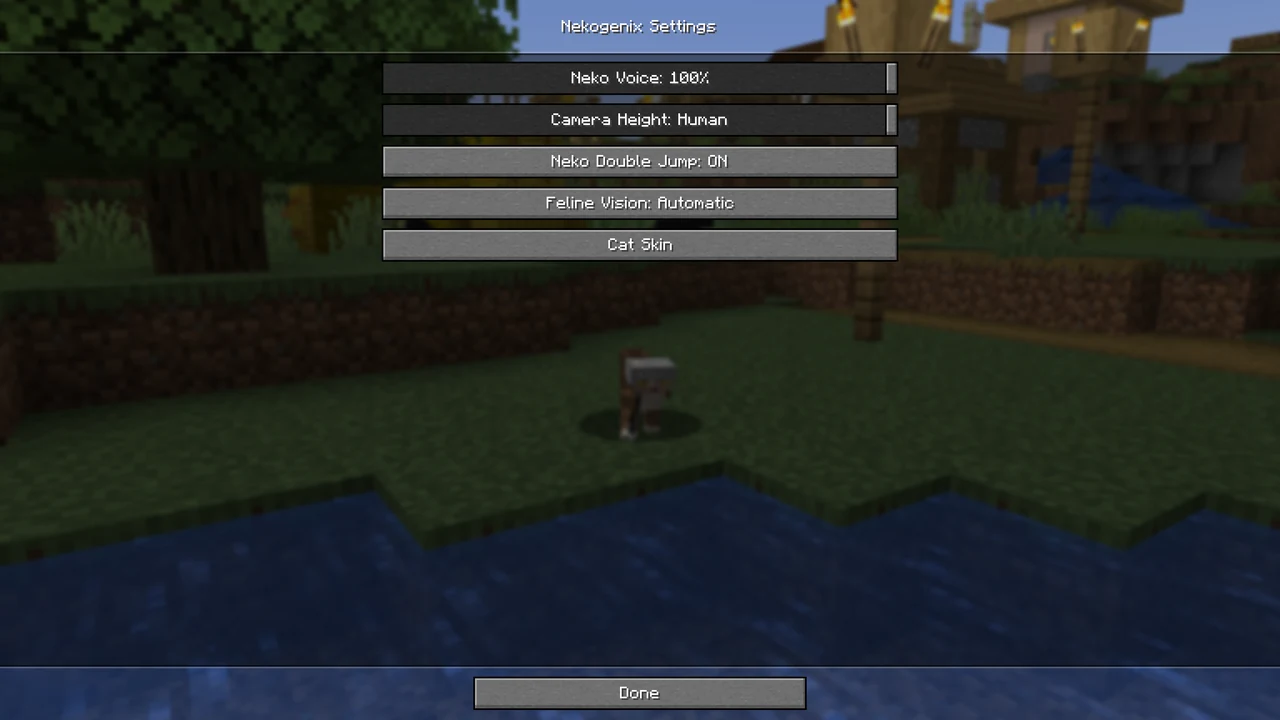
Open the settings
Open Mods → Nekogenix → Config from the title menu or while playing.
Adjust camera height and posture
Move Camera Height towards 0 to lower your view or towards 100 for human eye level. In cat form, values from 0 to 40 put you on four paws; higher values use an upright posture.
Set double-jump and vision controls
- Use Neko Double Jump to enable or disable the second jump.
- Leave Feline Vision on Automatic, or choose Manual to switch it yourself.
- In Minecraft’s Options → Controls → Key Binds, find Nekogenix and assign the vision toggle. You can also assign a double-jump toggle. Neither has a key assigned by default.
Adjust feline voice volume
Lower Neko Voice to make meowing and purring quieter, or set it to zero to mute them. This slider is also available in Minecraft’s sound options.